
#PARAN SILVERLIGHT#
  • Tistory
    • 관리자
    • 글쓰기
Carousel 01
Carousel 02
Previous Next

'PROGRAMING/SILVERLIGHT'에 해당되는 글 7건

  • 2012.02.08 Microsoft Service Trace Viewer
  • 2011.12.14 크로스 도메인(Cross Domain)
  • 2011.12.09 WCF RIA End Point : ODATA/SOAP/JSON
  • 2011.10.17 It is not possible to run two different versions of ASP.NET in the same IIS process
  • 2011.10.14 IIS 6 에러 확인 방법 : Event Viewer 이용
  • 2011.10.14 WCF RIA IIS6 Publish(개시) Error 핸들링
  • 2011.10.14 WCF RIA & Entity Data Model 개발 관련 에러 핸들링

Microsoft Service Trace Viewer

PROGRAMING/SILVERLIGHT 2012. 2. 8. 10:08

 Web Server Program으로 요청에러가 발생할 때 Trace 할 수 있도록 도와주는 툴


 Web.config 파일에 다음 항목을 추가하면 

 D:\FindCoworker\client_tracelog.svclog 위치에 파일이 생성된다.
 더블 클릭하면 위 프로그램이 실행된다.

  <system.diagnostics>
    <sources>
      <source name="System.ServiceModel" switchValue="Information,ActivityTracing"           propagateActivity="true">
        <listeners>
          <add name="ServiceModelTraceListener"/>
        </listeners>
      </source>
      <source name="System.Net.Sockets" switchValue="Information">
        <listeners>
          <add name="ServiceModelTraceListener"/>
        </listeners>
      </source>
      <source name="System.Net" switchValue="Information">
        <listeners>
          <add name="ServiceModelTraceListener"/>
        </listeners>
      </source>
    </sources>
    <sharedListeners>
      <add initializeData="D:\FindCoworker\client_tracelog.svclog"           type="System.Diagnostics.XmlWriterTraceListener, System, Version=2.0.0.0, Culture=neutral, PublicKeyToken=b77a5c561934e089"           name="ServiceModelTraceListener" traceOutputOptions="LogicalOperationStack, DateTime, Timestamp, ProcessId, ThreadId, Callstack"/>
    </sharedListeners>
    <trace autoflush="true" />
  </system.diagnostics>

저작자표시 비영리 (새창열림)
블로그 이미지

파란실버라이트

To remember the time when I started learning Silver Light!

,

크로스 도메인(Cross Domain)

PROGRAMING/SILVERLIGHT 2011. 12. 14. 11:21
참조 : http://blog.naver.com/catchbug?Redirect=Log&logNo=20130559763

실버라이트는 클라이언트에 다운로드되어 실행되지만, 실버라이트 런타임 샌드박스 안에서 실행이 된다.

그 말은 실버라이트는 사용하는 사용자의 PC에 프로그램이 다운은 되지만,

사용자 PC의 운영체제 권한으로 실행되는것이 아닌, 실버라이트 런타임의 제어를 받는 영역에서 실행이 된다는 이야기다.

또, 실버라이트 런타임은 실버라이트가 실행된 URL에 종속적이 된다.

이 말은 실버라이트 런타임은 호출 URL마다 각각의 영역이 갈린다는 이야기가 된다.

A사이트에서 실행된 실버라이트는 런타임 A영역에서, B사이트는 런타임 B영역에서 각자의 영역이 생긴다.

이 때 실버라이트가 실행된 URL이 아닌 다른 URL의 서비스를 호출하려고 하면, 크로스도메인 문제가 발생된다.

크로스도메인은 간단히 얘기하면 다른 URL의 리소스를 건드는 짓을 막는 보안규칙같은 것이다.

친절한 실버라이트께서는 다른 URL에 서비스를 호출하려고 하면 해당 서버에 '나 접속해도 돼??' 라고 물어 본다.

이때 이 물음에 답이 서버 루트에 clientaccesspolicy.xml 파일이다.

이곳에 설정되어있는 정보에 따라 접속을 하고 안하고를 결정한다.

<?xml version="1.0" encoding="utf-8"?>

<access-policy>

<cross-domain-access>

<policy>

<allow-from http-request-headers="*">

<domain uri="http://*"/>

<domain uri="https://*"/>

</allow-from>

<grant-to>

<resource path="/" include-subpaths="true"/>

</grant-to>

</policy>

</cross-domain-access>

</access-policy>


참조 : http://www.sqler.com/401814

기본적으로 실버라이트의 모든 네트워크 API는 실버라이트 .xap 파일이 게시되어 있는 도메인만 접근할 수 있습니다. 즉, 기본적으로 크로스 도메인이 지원 안된다는 것이죠.

다른 도메인에 있는 웹 서비스를 호출한다던지, 아니면 WebClient를 이용하여 다른 도메인에 있는 파일을 다운로드하는 경우에는 해당 도메인 쪽에 크로스도메인 정책 파일이 있어야 작동합니다. 이건 실버라이트가 원래 그렇게 만들어졌기 때문에 어쩔 수 없습니다.

크로스 도메인 접근을 허용하려면 다음과 같이 clientaccesspolicy.xml 을 만들어서 해당 도메인의 웹 루트 폴더에 넣어줘야 합니다.

<?xml version="1.0" encoding="utf-8"?>

<access-policy>

<cross-domain-access>

<policy>

<allow-from http-request-headers="*">

<domain uri="*"/>

</allow-from>

<grant-to>

<resource path="/" include-subpaths="true"/>

</grant-to>

</policy>

</cross-domain-access>

</access-policy>

위 파일의 내용을 설명한다면… “모든 http request에 대해서 현재 서버의 모든 도메인과 하위 경로에 대해서 다 접근해도 된다.” 라는 뜻이 됩니다.

만약, 어떤 서버에 여러 개의 웹사이트가 호스팅되고 있고, 각각이 도메인이 다르게 설정되어 있을 때, 일부 도메인만 허용하려면 다음과 같이 하면 됩니다.

<?xml version="1.0" encoding="utf-8"?>

<access-policy>

<cross-domain-access>

<policy>

<allow-from http-request-headers="*">

<domain uri="http://www.mydomain1.com" />

<domain uri="http://www.mydomain2.com" />

</allow-from>

<grant-to>

<resource path="/" include-subpaths="true"/>

</grant-to>

</policy>

</cross-domain-access>

</access-policy>

다음과 같이 특정 서비스 폴더 아래쪽만 접근하게 할 수도 있습니다.

<?xml version="1.0" encoding="utf-8"?>

<access-policy>

<cross-domain-access>

<policy>

<allow-from http-request-headers="*">

<domain uri="*"/>

</allow-from>

<grant-to>

<resource path="/services/" include-subpaths="true"/>

</grant-to>

</policy>

</cross-domain-access>

</access-policy>

clientaccesspolicy.xml 을 잘 사용하면 웹 서버의 보안성을 보다 높일 수 있겠죠?

한 가지 더 있습니다.

플래시에서도 이와 유사하게 crossdomain.xml 이라는 것을 사용합니다. 고맙게도 실버라이트는 clientaccesspolicy.xml 뿐만 아니라 crossdomain.xml도 지원하기 때문에 이미 플래시를 잘 지원하는 웹 서비스 사이트에 별도로 clientaccesspolicy.xml 를 넣지 않아도 실버라이트가 접근할 수 있도록 해줍니다.

예로 유튜브와 같은 서비스는 clientaccesspolicy.xml 가 없어도 crossdomain.xml가 있기 때문에 실버라이트에서 접근할 수 있지요.

한번 다음 링크를 열어보세요^^

http://www.youtube.com/crossdomain.xml

http://www.youtube.com/clientaccesspolicy.xml

참고로, crossdomain.xml은 다음과 같이 생겼습니다.

<?xml version="1.0"?>

<!DOCTYPE cross-domain-policy SYSTEM

"http://www.macromedia.com/xml/dtds/cross-domain-policy.dtd">

<cross-domain-policy>

<allow-http-request-headers-from domain="* " headers="*" />

</cross-domain-policy>

저작자표시 비영리 (새창열림)
블로그 이미지

파란실버라이트

To remember the time when I started learning Silver Light!

,

WCF RIA End Point : ODATA/SOAP/JSON

PROGRAMING/SILVERLIGHT 2011. 12. 9. 15:09

 WCF RIA 서비스를 사용해서  다른 END POINTD의 서비스를 생성하는 방법
 참조 : http://blogs.msdn.com/b/davrous/archive/2010/12/14/how-to-open-a-wcf-ria-services-application-to-other-type-of-clients-the-json-endpoint-4-5.aspx

 센차터치을 사용하여 하이브리드 웹 개발 중
 서버의 프로그램에서 END POINT를 JSON으로 사용하는 방법을 찾다가 발견하게 되었다.^^

 1. ORACLE data Provider for  Data Entity FrameWork Beta 버젼을 설치
   http://www.oracle.com/technetwork/topics/dotnet/downloads/oracleefbeta-302521.html
   User Table을 User.edmx 로 저장


 2. User.edmx파일을 가지고  WCF RIA 서비스를 생성 


 3. Web.Config 파일을 변경해서 ODATA, SOAP ,JSON으로 서비스를 제공
   WCR RIA 관련 툴킷을 설치해서  System.ServiceModel.DomainServices.Hosting와     Microsoft.ServiceModel.DomainServices.Hosting 가 참조되어야 한다.


 4. Test 결과
  a. Odata

  b. SOAP


  c. JSON


 이제 각 서비스를 Consume해서 어떻게 클라이언틀 구성하는 문제만 남았다. 이것만 남았으려나. ^^;


JSON_Test.zip

저작자표시 비영리 (새창열림)
블로그 이미지

파란실버라이트

To remember the time when I started learning Silver Light!

,

It is not possible to run two different versions of ASP.NET in the same IIS process

PROGRAMING/SILVERLIGHT 2011. 10. 17. 10:58

닷넷 2.0의 어플리케이션을 올린 웹사이트에 닷넷 4.0을 같이 실행해서 발생하였다.

해결방법 : 닷넷 4.0 어플리케이션을 실행하기 위해 새로 생성한 WebSite가 새로 생성한 application pool에서 실행되도록 설정.
              

저작자표시 비영리 (새창열림)
블로그 이미지

파란실버라이트

To remember the time when I started learning Silver Light!

,

IIS 6 에러 확인 방법 : Event Viewer 이용

PROGRAMING/SILVERLIGHT 2011. 10. 14. 14:30
 다음 사진대로 Event viewer 를 사용해 보세요. ^^


저작자표시 비영리 (새창열림)
블로그 이미지

파란실버라이트

To remember the time when I started learning Silver Light!

,

WCF RIA IIS6 Publish(개시) Error 핸들링

PROGRAMING/SILVERLIGHT 2011. 10. 14. 14:28

1.Assebmly 로딩 문제  : Domain service 관련 DLL이 개시 되었는지 확인


Solution Explorer에서 다음과 같이 설정해서 개시할 때 복사되도록 할 수 있다.


2. Multiple Authentication Schemes 문제 => IIS 보안 설정을 다음과 같이 한다.


web config 파일에 다음 스크립트 추가

<system.web>

<authentication mode="Forms">
<forms name=".ReportSample_ASPXAUTH" /> ReportSample =>자기 프로젝트 이름으로 변경
</authentication>
</system.web>


3. 자세한 사항을 궁금하시면 다음 기사를 참조하세요.

http://silverlightfeeds.com/post/1475/Deploying_your_Silverlight_and_WCF_RIA_Services_application.aspx

Deploying your Silverlight and WCF RIA Services application

by Tim Heuer via Method ~ of ~ failed by Tim Heuer on 12/10/2009 8:42:09 PM

So you’ve been playing around with Silverlight and WCF RIA Services (the artist formerly known as .NET RIA Services) and you are ready to deploy. You’ve been living in your happy Visual Studio environment, perhaps even relying on the built-in web server (a.k.a. Cassini) to serve up your pages/XAP to test. All has been well, you’ve done your testing and you are ready to publish to your server. You compile one last time and then right-click in Visual Studio on the web project and click Publish. You push to your IIS endpoint or via FTP and the files deploy. Sweet! Now you go visit your site. And it doesn’t work. WTF?

I’ve been getting some emails on RIA Services deployment gotchas and thought I’d take a stab at explaining some of the deployment nuances.

First it should be said that there is no greater supplement than having your dev environment match as close as possible to your ending target production environment. If you are using IIS6 to host your final application, then it would be ideal that it is also your development/test environment. I know this isn’t always possible for everyone, but if it is, make the effort and save yourself some time in the long run.

What is described below are some things you might run into. Not everyone will…some will not hit any of these. But hopefully if you do, this will be some insight.

Deploying the RIA libraries – to bin or not to bin

Your first error you may run into is assembly loading errors in your ASP.NET application. Perhaps it says that it cannot locate or load System.Web.Ria assembly? And here you thought the Publish command was going to deploy those for you, didn’t you (note: so did I). Well, they aren’t. You can do two things here.

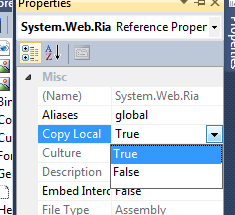
First, you can “bin deploy” if you want. That term means that you would deploy any non-core framework assemblies in your web applications /bin directory, making them locally available to the web application. If you want to go this route, you can. You have to manually go into your references in your web application and change the Copy Local property on some assemblies:

Change Copy Local Property image

The assemblies you would want to do this on (depending on what you have referenced) would be:

  • System.Web.Ria
  • System.Web.DomainServices.* (there 4 of them depending on what you are using)
  • Microsoft.RiaServices.Tools UPDATE: this assembly only required for design-time experiences

Once you do that, on your next compile, these assemblies would be copied to your bin directory and then the subsequent Publish action would also push those to your server.

The second option you have is to install the RIA Services server libraries on the server in the Global Assembly Cache (GAC). You may have tried this already and run the RiaServices.msi installer on your server and received the warning that you are missing Visual Studio and all sorts of tools.

And then you walked away and went the bin-deploy route. Well open up a command prompt and run this instead:

   1: msiexec /i RiaServices.msi SERVER=TRUE

And the server assemblies for RIA Services will be installed into the GAC for all to enjoy. The advantage this has is that it becomes easier to service if you have one set of assemblies to update versus a few /bin deployed applications scurried all over the place.

HTTP Scheme violation and IIS host-headers

Now you run your application and you get this exception:

This collection already contains an address with scheme http. There can be at most one address per scheme in this collection.
Parameter name: item

Now you’re starting to wish your development environment mirrored your deployment environment aren’t you? :-) This lovely error message will leave you wondering what is going on for a while if you didn’t know what it meant. I mean, it’s completely descriptive isn’t it? Of course not.

If you are getting this, you are likely running Windows 2003 server (IIS6) and are using host-headers in IIS.

NOTE: Host headers in IIS allow you to leverage a single IP address, but have separate web sites that respond to different hostname requests. This information is usually provided in the IIS management console and is stored in the IIS metabase.

If this isn’t you, or you aren’t controlling your server, I’m guessing you are in a shared hosting environment.

NOTE: Full trust is required for RIA Services. UPDATE: Partial trust is supported for .NET4/VS2010, full trust requirement is only for .NET 3.5/VS2008.

Either way, what you are seeing is a limitation of Windows Communication Foundation (WCF) under .NET 3.x. There are a few things you can do here.

If you are running .NET 3.0 (well, you likely aren’t running RIA Services then are you) – but here’s some information on creating your own ServiceHostFactory…which isn’t really an option here.

If you are running .NET 3.5 (more likely), and can get to your web.config setting, you can add this setting:

   1: <system.serviceModel>
   2:     <serviceHostingEnvironment aspNetCompatibilityEnabled="true">
   3:         <baseAddressPrefixFilters>
   4:             <add prefix="http://some.url.here.that.matches.a.host.header"/>
   5:         </baseAddressPrefixFilters>
   6:     </serviceHostingEnvironment>
   7: </system.serviceModel>

Note that the prefix you are using must match the base URI of where your DomainService will be at as well as it must exist as a mapped host-header for the site. More information available here.

if you are running .NET 4, you may not run into this issue, but there may be an optional opt-in configuration you will have to do when .NET 4 releases.

UPDATE: HttpModule for DomainService

Perhaps one thing that I assumed was that you’d be pushing the web app completely. But what if you already have a web.config and you aren’t pushing that over there. Well, pay attention to the web.config of a RIA Services created project. You’ll see an HttpModule set up (this one is from VS2010, but will be similar, just version numbers different):

   1: <httpModules>
   2:     <add name="DomainServiceModule" type="System.Web.Ria.Services.DomainServiceHttpModule, 
   3:         System.Web.Ria, Version=4.0.0.0, Culture=neutral, PublicKeyToken=31BF3856AD364E35" />
   4: </httpModules>

If you don’t have this, then you might see some weirdness. You see, for the default deployment, the service is handled through this module. You may have noticed that there are no physical .SVC files in your web app. If you look with Fiddler at your Silverlight/RIA Services application in action you’ll see something like /ClientBin/Your-Namespace-Here-Method.svc/binary. This is actually interpreted by the module to map the request.

If you wanted to generate a physical file yourself, you can do that and the request would be processed there versus through the virtual SVC file generated. You can read about this in Saurabh’s post.

Multiple Authentication Schemes

Okay, now you run it again and you get a message about it not supporting multiple authentication schemes and that you may have. The message may look like this:

IIS specified authentication schemes 'IntegratedWindowsAuthentication, Anonymous', but the binding only supports specification of exactly one authentication scheme. Valid authentication schemes are Digest, Negotiate, NTLM, Basic, or Anonymous. Change the IIS settings so that only a single authentication scheme is used.

This can be a result of your <authentication> node in your ASPNET application being set to Windows, but your site being set to Anonymous in IIS. For most, simply changing <authentication> node to mode=”Forms” will remove this error and allow you to continue. For others, if your IIS configuration is set to use both Integrated Auth as well as Anonymous, you’ll want to uncheck one of them in the Directory Security setting for the site in IIS management console.

Install the Hotfix (XP, Vista, Windows 2003)

As noted on the RIA Services information page, if you are not running Windows 7 or Windows 2008 R2, you need to install a Hotfix. Some people haven’t seen this note, so be sure if you fall in that category that you grab the appropriate hotfix for your architecture and run it. UPDATE: This hotfix is only needed if you are using VS2008.

Essential Tools

So how can you troubleshoot all these things? Some wondered where I was able to get the error messages, when their response errors in Silverlight were just showing NotFound. I’ve said this again with regard to debugging services, especially cross-domain stuff, that if you aren’t using an HTTP diagnostic tool you are hurting your productivity in debugging. I use Fiddler. I used to use Web Development Helper a lot more, but have run into some problems with it registering in IE and Fiddler has finally got rid of all nuances that bothered me with it. Some others have used Charles proxy which I’ve heard is really great, but requires Java if you don’t have it. Any one of these tools can provide invaluable debugging information to help triage your issue. Sometimes the HTTP response code isn’t the full story and the response body will help tremendously.

NOTE: If you are using Fiddler for http://localhost debugging, you may have seen some challenges. In the URL, change to http://127.0.0.1./site – noting the trailing “.” after the IP address. Example: http://127.0.0.1.:12345/MyApp – this will trigger Fiddler to monitor those requests as well.

For WCF binary encoding messages, be sure to download WCF Binary-encoded message inspector if you are using Fiddler…it’s awesome (hat tip to Dan Wahlin for the tip).

Summary

I suspect anyone running into these issues above is likely using Silverlight 3/VS2008 and deploying to an IIS6 instance. Truly this is where the issues might manifest themselves. When WCF RIA Services comes out of beta/ctp status and releases next year, the development story will be that of Silverlight 4 and .NET 4 on the server. As noted above, these WCF issues (with host-headers) are solved with .NET 4 on the server, so this post will be useless when the bits release.

I hoped by posting this though, that some in the interim might find some better troubleshooting tips with regard to the shared hosting scenario mostly. I personally ran into a few of these myself on my own dedicated server that uses host-headers (but is still full trust), so I thought others might benefit from the steps that I went through to get my RIA Services application deployed on a server.

Hope this helps.

tags: silverlight, riaservices, ria, wcf ria services, wcf, services, xaml

This work is licensed under a Creative Commons Attribution By license.
저작자표시 비영리 (새창열림)
블로그 이미지

파란실버라이트

To remember the time when I started learning Silver Light!

,

WCF RIA & Entity Data Model 개발 관련 에러 핸들링

PROGRAMING/SILVERLIGHT 2011. 10. 14. 14:12

1. Data Load가 되지 않을 때 Data Connection을 설정할 때 다음과 같이 설정하여 Sensitive data가 빠지지 않았나 확인한다.
 Yes를 선택하거나 , Web.config 파일에서 빠진 부분을 추가한다.

<connectionStrings>
<add name="Entities" connectionString="metadata=res://*/Customer.csdl|res://*/Customer.ssdl|res://*/Customer.msl;provider=Oracle.DataAccess.Client;provider connection string=&quot;DATA SOURCE=ID=&quot;" providerName="System.Data.EntityClient" />
</connectionStrings></configuration>


2. select(load) opration은 실행되지만 update, insert ,delete operation에서 submit_changed()에서 에러가 발생한다면

Domain Service 파일에 다음 함수를 오버라이드 해서 errorinfor 에서 서버 에러원인을 찾는다.


protected override void OnError(DomainServiceErrorInfo errorInfo)
        {
            //Log exception errorInfo.Error 
        }

Entity로 사용한 DB table Primary key 없다면 sub_changed가 일어나지 않으므로 Key를 꼭 등록하여야 한다.


3. Client 에서 Submit_changed 가 일어난 이유 call back 함수를 이용해서 디버깅 하는 방법
  SubmitChanges(OnSubmitCompleted, null); 이용한다.


        private void BtnAdd_Click(object sender, RoutedEventArgs e)
        {
            CustomerResistartionWindow addCus = new CustomerResistartionWindow();
            addCus.Closed += new EventHandler(addCus_Closed);
            addCus.Show();
        }
        // Entity 추가
        void addCus_Closed(object sender, EventArgs e)
        {
            CustomerResistartionWindow cusWidow = (CustomerResistartionWindow)sender;
            AWWIPCUSTOMERUSERLIST cust = (AWWIPCUSTOMERUSERLIST)cusWidow.NewCustomer;
            if (cust != null)
            {
                CustomerContext.AWWIPCUSTOMERUSERLISTs.Add(cust);
                CustomerContext.SubmitChanges(OnSubmitCompleted, null);
                tbValidation.Text = cust.CUSTOMER + " User List Added!";
            }
        }
        // entity 제거
        private void BtnDelete_Click(object sender, RoutedEventArgs e)
        {
            AWWIPCUSTOMERUSERLIST cust = (AWWIPCUSTOMERUSERLIST)dataForm1.CurrentItem;
            CustomerContext.AWWIPCUSTOMERUSERLISTs.Remove(cust);
            CustomerContext.SubmitChanges(OnSubmitCompleted, null);
            tbValidation.Text = cust.CUSTOMER + " User List Deleted!";
        }
       // Entity 수정
        private void BtnModify_Click(object sender, RoutedEventArgs e)
        {
            if (CustomerContext.HasChanges)
            {
                AWWIPCUSTOMERUSERLIST cust = (AWWIPCUSTOMERUSERLIST)dataForm1.CurrentItem;
                dataForm1.CommitEdit();
                CustomerContext.SubmitChanges(OnSubmitCompleted, null);
                tbValidation.Text = cust.CUSTOMER +  " User List Modified!";
            }
        }
        // Submit operation의 결고 객체로 확인
        private void OnSubmitCompleted(SubmitOperation so)
        {
            if (so.HasError)
            {
                MessageBox.Show(string.Format("Submit Failed: {0}", so.Error.Message));
                so.MarkErrorAsHandled();
            }
            CheckChanges();
        }
// Entity Set 변화를 확인
        private void CheckChanges()
        {
            EntityChangeSet changeSet = CustomerContext.EntityContainer.GetChanges();
            string text = changeSet.ToString();
            bool hasChanges = CustomerContext.HasChanges;
        }

저작자표시 비영리 (새창열림)
블로그 이미지

파란실버라이트

To remember the time when I started learning Silver Light!

,
  • «
  • 1
  • »

카테고리

  • Inforamtion Technology (281)
    • DESIGN PATTERN (33)
      • 실용주의 디자인패턴 (29)
    • SOFTWARE ENGINEERING (21)
      • Art Of Readable Code (12)
      • Object Oriented Programming (6)
      • TDD (2)
    • FRAMEWORK (22)
      • Spring.net (2)
      • LightSwitch (20)
    • PROGRAMING (58)
      • C# (20)
      • .NET (6)
      • HTML5 (7)
      • ASP.NET (9)
      • SILVERLIGHT (7)
      • Ruby On Rails (6)
    • PROJECT MANAGEMENT (10)
      • SW Version Management (7)
      • Schedulring Management (1)
    • BOOKS (18)
    • MOBILE APP (1)
      • SENCHA TOUCH (1)
    • SECURITY (5)
    • MES (1)
    • B2B (14)
      • WEBMETHODS (4)
    • ERP (53)
      • SAP/R/3 (51)
    • ABOUT TOOLS (2)
    • FUNDAMENT CONCEPT (21)
    • SOA BPM (22)
    • PORTFOLIO (0)

태그목록

  • 프로그래밍
  • 동시성
  • 병렬

최근에 받은 트랙백

글 보관함

링크

파란실버라이트

블로그 이미지

To remember the time when I started learning Silver Light!

LATEST FROM OUR BLOG

RSS 구독하기

LATEST COMMENTS

BLOG VISITORS

  • Total :
  • Today :
  • Yesterday :

Copyright © 2015 Socialdev. All Rights Reserved.

티스토리툴바